
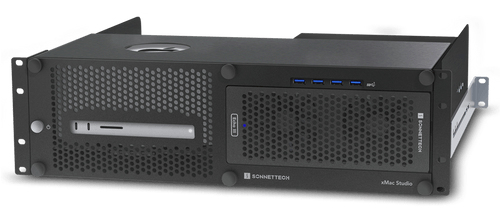
Designed for ExpansionConnect Specialty Audio and Video CardsThree Systems to Choose FromFor many creative professionals. PCIe card expansion for connecting specialty cards to handle audio and video post-production projects is not an option — it’s a necessity! Sonnet designed the xMac Studio for pro workflow flexibility; choose a system configured with a Thunderbolt to PCIe card expansion module that best suits your needs. xMac Studio is also available without a module so you can add one at a later date. or use one of your existing compatible Sonnet expansion modules*.xMac Studio/Echo IIIProfessional 3U Rackmount Enclosure with Three Slot Thunderbolt to PCIe Card Expansion System for Mac StudioDesigned for Three PCIe Cards Expansion – Connect Speciality Audio and Video CardsFor many creative professionals.
PCIe card expansion is not an option – its a necessity for connecting specialty cards to handle audio and video post-production projects. xMac Studio is a rugged steel 3U rackmount enclosure for securing a Mac Studio with optional PCIe card expansion module in a rack. placing the Mac Studio behind a quick and easy to remove front panel. Sonnet designed the xMac Studio/Echo III for pro workflow flexibility; a rugged steel enclosure protects the Mac Studio while a three slot PCIe expansion module provides expansion for up to three PCI cards. including support for up to three Avid Pro Tools | HDX cards.Echo III Expansion Module FeaturesVersatile PCIe Card Expansion – From low-profile. half-length to full-height. full-length in size.
Echo expansion modules support every Thunderbolt-compatible. non-GPU PCIe card available. AJA® Kona® 5. Blackmagic Decklink 4K Extreme 12G. and Blufish444’s Epoch and KRONOS SDI cards.
When equipped with an Echo III or Echo I PCIe Card Expansion Module. three rear panel locking thumbscrews allow you to easily pull out and access the module and PCIe cards through the front without removing the front panel. xMac Studio’s design enables you to connect and disconnect cables without needing to remove the Mac Studio from the enclosure.An opening on top of xMac Studio ensures hindrance-free wireless signal access.
Ventilation holes on the enclosure’s front panel plus an enclosed chamber beneath the Mac Studio ensures the computer’s ability to draw in cool air through its base. while a completely open back enables it to expel warm air out the back unimpeded.Space for SSD Drives – Secure up to Three Thunderbolt or USB SSD Drives Under the Mac StudioxMac Studio provides space beneath the computer to house up to three Thunderbolt or USB SSDs (sold separately) up to 3.2 inches wide by 0.75 inch tall.
Simply remove the rear access panel. apply the supplied adhesive-backed magnet to the bottom of the SSD. insert the SSD and connect it to the computer. and then reinstall the panel. The space is also suitable for other thin. bus-powered devices.Road Trip Ready – Workflows on the GoDo you need to take your workflow on the road? The xMac Studio is a perfect travel solution.
Its 16.5-inch mounting depth – plus firm rubber cushions that securely hold your Mac Studio in place during transport – make xMac Studio ideal for use in molded rack cases from Gator Cases. fly racks from SKB Cases. or most any travel rack.