
Style
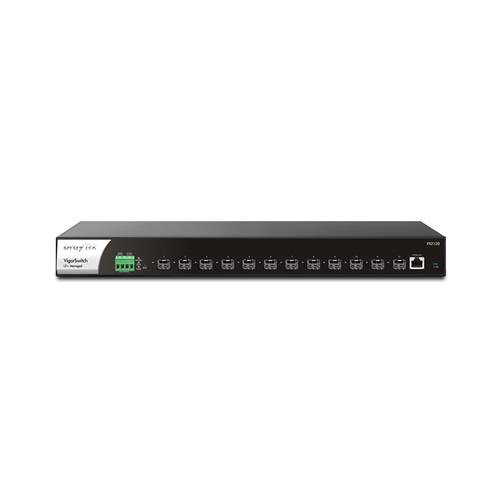
DrayTek VSFX2120-K VigorSwitch FX2120 12-Port Layer 2+ Managed Rackmount 10-Gigabit SFP+ Switch
Shopping from outside our current PriceShaker markets?We don't yet have a local PriceShaker price or confirmed shipping for your country. You can still try the retailer directly; availability, currency, delivery and the final price will be confirmed by the retailer.
BEST LIVE PRICE£399.72Quzo UK · checked 3 days ago
2 eligible offers below
PriceShakerEMAIL PRICE ALERT

Choose how often PriceShaker checks. We only message when the observed price actually moves.

PRICE HISTORY

Price trend

COMPARE RETAILERS

Cheapest eligible offers

2 live
Quzo UK
Checked 3 days ago
£399.72
PcNova.co.uk
Checked 2 weeks ago
£380.26

Affiliate commission never affects price ranking.

DrayTek VSFX2120-K VigorSwitch FX2120 12-Port Layer 2+ Managed Rackmount 10-Gigabit SFP+ Switch

<B>The Draytek Fx2120 Vigorswitch 12-Port Layer 2+ Managed Rackmount 10-Gigabit Sfp+ Switch</B> Has A Plethora Of Management Options And Enterprise-Level Features To Improve Network Stability And Security For Businesses. The Sfp+ Module Slots Are Ideal For Core And Distribution Network Deployments. Use Faster Links To Connect With Business-Critical Appliances Including Nas Drives Distribution Switches And Servers.

Designed For Centralised Management The Vigorswitch Fx2120 Can Be Provisioned And Monitored Through Both The Vigoracs Management Platform And/Or A Draytek Vigor Router?

Price integrityHigh confidence · 88/100PriceShaker found no major pricing-integrity warning in the data currently available.
Shake Score 61.8/100
PS Verified Saving 4.9%
Retailer claimed saving 13.0%
Historical low£380.26
Building price historyPriceShaker is collecting independent observations before issuing a verified buy/wait verdict.
PriceShakerEMAIL PRICE ALERT

Tell PriceShaker how often to check. We only message you when the observed price actually moves up or down.

PRICESHAKER PRODUCT SNAPSHOT

Live price evidence for DrayTek VSFX2120-K VigorSwitch FX2120 12-Port Layer 2+ Managed Rackmount 10-Gigabit SFP+ Switch

PriceShaker compares eligible live retailer offers in your selected market and keeps retailer-supplied claims separate from prices we have independently observed over time.

ProductDrayTek VSFX2120-K VigorSwitch FX2120 12-Port Layer 2+ Managed Rackmount 10-Gigabit SFP+ SwitchMore Draytek prices →
Live comparison2 retailers from £399.72Lowest eligible current price shown first.
Product identifiersVSFX2120-KGTIN 4710484744548
FreshnessChecked 3 days agoFinal price, delivery and stock are confirmed at retailer checkout.
PRODUCT DETAILS

About this product

01
OverviewWhat matters most about this product

<B>The Draytek Fx2120 Vigorswitch 12-Port Layer 2+ Managed Rackmount 10-Gigabit Sfp+ Switch</B> Has A Plethora Of Management Options And Enterprise-Level Features To Improve Network Stability And Security For Businesses. The Sfp+ Module Slots Are Ideal For Core And Distribution Network Deployments. Use Faster Links To Connect With Business-Critical Appliances Including Nas Drives Distribution Switches And Servers.

Designed For Centralised Management The Vigorswitch Fx2120 Can Be Provisioned And Monitored Through Both The Vigoracs Management Platform And/Or A Draytek Vigor Router?S Central Switch Management. Easily Provision The Vlan Configuration Through The Router And Clone Switch Configurations. The Faster 10 Gigabit Uplink Capability Allows You To Make High Bandwidth Links To Network Attached Storage Servers And Other Switches To Help Reduce The Risk Of Bottlenecks Occurring Within Your Network.

The Sfp+ Ports Provide Compatibility With Your Choice Of Sfp / Sfp+ Modules (Not Included) And Therefore The Most Appropriate Medium For Your Application. The Switch's Access Control List Gives Full Control Of What Traffic Routes Between Those Networks.<Br/><Br/><B>Vlan Routing</B><Br/>A Draytek Vigorswitch Normally Provides Connectivity For Multiple Network Segments With 802.1Q Vlan Tags Which Separate Networks At Layer 2 (Mac Level) Relying On The Router To Connect Different Networks.

Vlan Routing In The Switch Allows For Layer 3 (Ip Level) Routing To Connect And Route Between Different Ip Subnets With Wire Speed Routing Performance.<Br/><Br/><B>Static Route</B><Br/>Routing Beyond The Vigorswitch Fx2120 To The Internet And Across Vpns Is Possible With Static Routes Using The Switch To Direct Traffic To Remote Subnets Through The Correct Gateway. Up To 512 Static Routes Can Be Configured On The Switch.<Br/><Br/><B>Dhcp Server With Bind Ip To Mac</B><Br/>The Draytek Vigorswitch Fx2120 Has An Integrated Dhcp Server To Provide Ip Addressing To As Many As 8 Subnets On The Switch Directly Or With Another Server Through Dhcp Relay.

Each Dhcp Pool Can Have As Many As 1023 Ip Addresses Potentially Serving Addresses To 8000 Devices Allowing For Expansive Networks And Taking Load Off Of The Router. With Bind Ip To Mac Ip Addresses Can Be Easily Reserved For Individual Devices Such As Servers Ip Phones Cameras And More.<Br/><Br/><B>Rack Mountable & Silent</B><Br/>Install The Vigorswitch On A Desk Shelf Or Wall Or Use The Included Rack Mount Fittings To Install The Switch In Any Standard 19" Rack With 1U Height.

Draytek Vigorswitch Switches That Support Tr-069 Management Can Be Managed Through Draytek Vigoracs 3 In The Same Way That A Draytek Vigor Router Or Vigorap Access Point Would Be Managed. Through Vigoracs You Can View And Manage; A Single Vigorswitch All Switches On A Site Or All Switches Across An Entire Network Spanning Multiple Sites In One Place. Central Switch Management Requires Firmware Support On Both The Vigorswitch And The Draytek Vigor Router.

Descriptive Names Can Be Configured On The Router Which Can Be Seen From The Switch Hierarchy View. If A Camera Goes Offline The Vigorswitch Sends Out An Email Alert With The Last-Seen Snapshot From The Camera That's Stopped Responding Allowing You To Locate The Affected Camera Easily And Troubleshoot Any Problems It May Have Such As A Disconnected Cable Or Faulty Camera.<Br/><Br/><B>Ip Conflict Detection & Prevention</B><Br/><B>Conflict Detection</B><Br/>The Vigorswitch Can Detect And Notify An Administrator When An Ip Conflict Is Detected On The Network.

Easily Track Down Conflicts And Take Action To Resolve Them.<Br/><Br/><B>Conflict Prevention</B><Br/>Use Draytek's Ip Conflict Prevention To Allow The Switch To Automatically Protect Against Ip Conflicts And Arp Spoofing. Ip Conflict Prevention Catalogues The Current Network Layout Giving You The Option To Fix The Ip Address And Mac Information For Important Network Devices Such As Servers And Routers.

02
Technical detailsFeed specifications, organised for quick scanning
Drastically Reduce The Setup Time Required For A Complex Network With Vlans Spanning Multiple Switches
<Br/><Br/><B>10Gbe Sfp+ Ports For High-Speed Uplinks</B><Br/>The Draytek Vigorswitch Fx2120 Has 12 Dedicated Sfp+ Ports Each Operating At Up To 10 Gigabits Per Second
Connect A Passive Direct Attach Sfp+ Cable Such As The Draytek Dac-Cx10-01M (Sold Separately) To The Sfp+ Module Port Of 1Gbps/10Gbps Capable Network Attached Storage Servers And Switches For A Cost-Effective Up To 10Gbps Network Link
<Br/><Br/><B>Advanced Layer 2+ Routing Features</B><Br/>The Vigorswitch Fx2120 Adds The Layer 3 Features Vlan Routing Dhcp Server And Static Route Which Allow The Switch To Provide Routing Between Vlans At Full Speed
Ideal For Installation In Quiet Office Environments The Vigorswitch Fx2120 Runs Quietly Cooling With A Hardware-Monitored Fan
<Br/><Br/><B>Central Management</B><Br/>The Draytek Vigorswitch Fx2120 Can Operate In Standalone Mode And Be Managed Through Its Web Interface Or If You Need To Manage And Monitor The Switch Remotely Or Have Several Draytek Vigorswitches To Administer You Can Centrally Manage And Monitor Them Either With:<Br/><Br/><B>Router - Switch Management</B><Br/>Manage Vigorswitches Connected To A Router And Determine Network Topology At A Glance
<Br/><Br/><B>Draytek Vigoracs</B><Br/>Manage And Provision Draytek Vigorswitches On Any Network From Anywhere
<Br/><Br/><B>Draytek Vigorconnect</B><Br/>Manage And Provision Vigorswitches And Vigoraps On A Single Site
Draytek Vigorswitches Connected To Vigoracs Connect Directly To The Vigoracs Server To Be Managed The Router Or Network That They Are Connected To Needs No Additional Configuration Beyond The Vigorswitch Having Access To The Internet (Or If Your Vigoracs Server Is Located Across A Private Wan / Vpn Connection Access To That Network)
<Br/><Br/><B>Dashboard View</B><Br/>Dashboard View Displays An Overview Of The Vigorswitch Fx2120's Port Usage And Port States
<Br/><Br/><B>Switch Configuration</B><Br/>View The Configuration Of A Vigorswitch And Make Changes To The Configuration Through Vigoracs Then Copy The Settings From That Switch To Apply Them To Multiple Vigorswitch Switches
<Br/><Br/><B>Central Switch Management With A Draytek Vigor Router</B><Br/>Draytek Vigor Router Central Switch Management Provisions And Monitors Vigorswitch Switches Through A Draytek Vigor Router With Profiles That Can Be Applied To Multiple Switches And Vlan Configuration All Handled Within The Router
This Can Simplify The Setup Of Multiple Subnets And Vlans Without Needing In-Depth Knowledge Of Vlan Tagging And Reduces Setup Time With The Time-Consuming Step Of Configuring Vlans For Each Port Handled By The Router Instead
<Br/><Br/><B>Switch Hierarchy</B><Br/>The Switch Hierarchy View Provides A Visual Overview Of Interconnections Between Draytek Vigorswitch Switches With The Devices Connected To Each Lan Port
Vlan Configuration Of A Vigorswitch Can Be Provisioned From The Draytek Vigor Router With The Router Automatically Configuring The Uplink Port And Being Aware Of The Vlan Tags That The Vigor Router And The Connected Lan Port Have Available
<Br/><Br/><B>Onvif Ip Camera Management</B><Br/>The Vigorswitch Fx2120 Can Discover Manage And Configure Onvif (Open Network Video Interface Forum) Compatible Ip Cameras And Nvr Systems Allowing For Easy Discovery Management And Troubleshooting Of Your Connected Ip Cameras
<Br/><Br/><B>Device Management</B><Br/>Use The Vigorswitch To Configure And Manage Your Ip Camera Network; Configure Network & Security Settings Restart Cameras And Have The Switch Monitor Whether Cameras Are Responding Alerting Of Any Issues
<Br/><Br/><B>Network Surveillance Topology</B><Br/>Simply Connect Onvif Capable Devices To The Vigorswitch Fx2120 Discover Devices And The Vigorswitch Determines The Network Topology Of Connected Cameras & Nvr Systems
<Br/><Br/><B>View Ip Camera Output</B><Br/>Through The Vigorswitch Web Interface You Can View The Video Feed Of Connected Ip Cameras
<Br/><Br/><B>Camera Offline Alerts With Snapshot</B><Br/>The Vigorswitch Fx2120 Can Store A Recent Snapshot Of Each Connected Ip Camera That's Onvif Compliant
Control Port Access For Every Port On Your Network With The Vigorswitch Access Control List - To Specifically Allow Or Deny Specified Traffic Types Moving Between Ports Just Like A Firewall
<Br/><Br/><B>Access Control List</B><Br/>Similar To A FirewallThe Acl Can Control Which Packet Types (Ipv4 Ipv6 & Mac) Are Allowed To Pass Between Ports On The Switch
<Br/><Br/><B>Aaa - 802
1X Authentication</B><Br/>Control Access To Lan Ports Through A Radius Server Which Could Be Provided By The Vigor 2862 Router On Site (Sold Separately)
The Vigorswitch's Igmp Querier Allows It To Manage Igmp Subscriptions On Its Network Ports Checking Which Ports Are Members Of Which Multicast Group If The Network's Router Does Not Support Multicast
<Br/><Br/><B>Ipv6 Ready</B><Br/>The Vigorswitch Fx2120 Has Extensive Ipv6 Support With Ipv6 Acl Mld Snooping And Ipv6 Dns Resolution
Interoperability With Other Types And Manufacturer's Equipment Is Handled By The Link Aggregation Control Protocol (Lacp)
<Br/><Br/><B>Im