
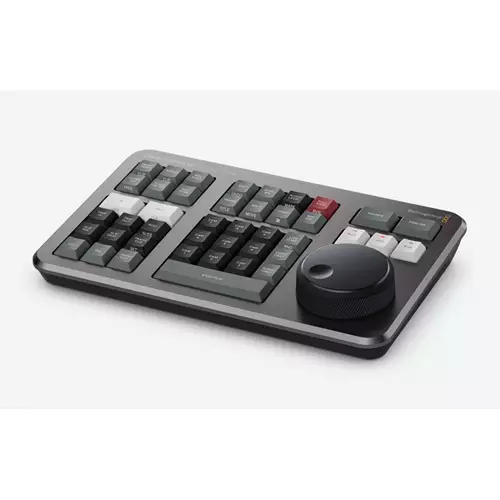

<h4>DaVinci Resolve Speed Editor</h4><p>The DaVinci Resolve Speed Editor features a machined metal search dial in a design that includes only the specific keys needed for editing. It also has Bluetooth with internal battery for connecting wirelessly or you can connect via USB-C. That means it's more portable than a full sized keyboard!<br /><br />SEARCH DIAL CONTROL<br />The DaVinci Resolve keyboards allow a better quality editing experience because they create a physical connection to the edit that’s deeper than a simple computer mouse.
The search dial is a machined metal design so it has a weighted feel and it can be spun fast to move up and down the timeline quickly. However the search dial is more than this because it can be used for live trimming! Simply press one of the trim buttons and the search dial will transform into a large adjustment knob for real time precise trimming.
Once you've experienced trimming with the search dial it's virtually impossible to go back to a mouse.<br /><br />TRANSPORT CONTROL<br />Hardware control panels are perfect for fast playback control. Instantly start and stop playback using the space bar style button that's positioned so it can be pressed with your thumb. The shuttle jog and scroll buttons change the function of the search dial so you can edit fast and accurately.<br /><br />SOURCE TAPE FOR SCROLLING CLIPS<br />Traditional edit software uses thousands of clips to organize your media so you need to constantly click and drag clips to edit.
That’s too slow for work such as TVCs news promos and training videos. However old tape based linear editing had the advantage of all media being played from a videotape so you could simply fast forward and rewind to see all your shots. Now the cut page has a modern version of the videotape and it’s called the source tape.
Simply push the source button and use the search dial to scroll through all your media. Plus the current clip is highlighted live in the bin. After the edit the viewer will stay in the source tape so you can move to the next shot faster.<br /><br />FAST IN AND OUT POINTS<br />Entering in and out points is the most used function in editing so the speed editor keyboard includes large in and out point buttons that you can easily locate by feel.
That’s perfect for two handed editing where you're using your right hand for transport control and your left hand is placing in and out points and performing edits. You can simply scroll along with the search dial and place in and out points anywhere you want. Once the in and out points are set just reach your fingers up to the edit function buttons to perform the edit.
The in and out points can also be used to focus the source tape. Then you can change the source tape back to the whole bin by pressing the escape key.<br /><br />INTELLIGENT KEYBOARD EDIT MODES<br />Editing with a keyboard is different to editing with a mouse so the cut page editing functions have been upgraded to take advantage of the speed of a keyboard. The edit functions are intelligent and use the smart indicator in the timeline to work out where to insert so most of the time you don't need to place in or out points in the timeline to do an edit.
They are located just above the in and out keys so are easy to locate by feel. Plus each time you edit the cut page won't waste time switching over to the timeline allowing you to stay in the source tape and visually browse placing clips continuously. That's much faster as you can just keep throwing clips into the timeline.</p><table class=features><thead><tr><th colspan=2>Features</th></tr></thead><tbody><tr><td class=feature>Type</td><td>Keyboards </td></tr></tbody></table>